
I need to queue work on various GPUs to run experiments, and I want to do that as cheaply as possible:
- Use my personal GPU for small jobs
- Use remote GPUs I have access to over SSH (without sudo!), only using the GPUs assigned to me
- Rent GPUs from services like RunPod, ensure they actually work, and (consistently!1) shut them down when I’m done
Surprisingly, this doesn’t seem to exist, so I built my own4. Queueing a few jobs, checking their status, and then tailing a job’s logs
My use-case is weird2. I assume many researchers work at a lab with infinite money and support staff, and don’t need to worry about silly things like only renting GPUs for the bare minimum amount of time.
I figured independent AI safety researchers might disproportionately need tools that don’t assume they have infinite money though, so I’m also sharing it here. If anyone finds this useful, or would find it useful if not for [insert bug here], let me know!
Features
- Everything is decentralized.
- Queue hosts only need SSH, rsync, and the NVIDIA driver.
- Clients can attach to multiple hosts and queue jobs on them.
- Multiple clients can attach to the same host.
- Once a job is queued, the client can go offline and everything will keep running.
- You can queue jobs and they execute in priority order with optional preemption, with the ability to do things like set estimates, upload results, and automatically clean up working directories.
- There’s a CLI optimized for Claude usage (just send
!gpuc skillin a conversation), including optional JSON output, plus a web UI5. - Rentals run health checks and timeouts on startup, and automatically shut themselves down when the queue is empty for long enough.
- Supports filtering hosts by CUDA version for RunPod.
- There’s built-in integration6 with Snakemake7.
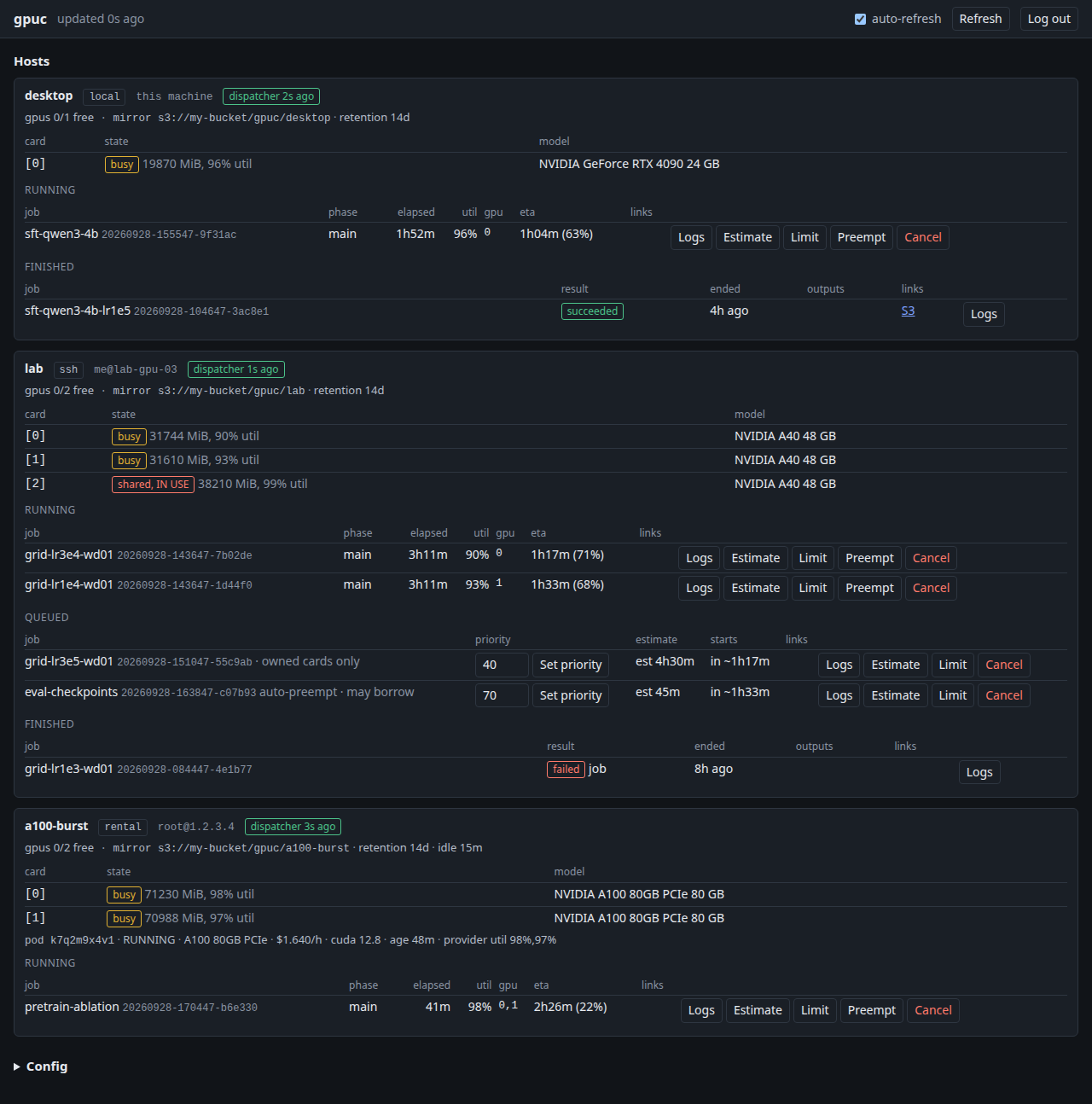
The web UI
Current Gaps
Some of these are non-goals; most are things I just haven’t got around to. Let me know if one of these is a blocker to you.
- No multi-user support.
- Although you can specify which cards you’re allowed to use (“owned” or “shared”). Shared cards will only start jobs if they have non-zero usage.
- Generally assumes you don’t want to run in a container.
- I’m not opposed to this, but most of my use-cases are all situations where I don’t have sudo so it hasn’t been a priority.
- RunPod is the only rental provider.
- I expect that others will be easy to add but haven’t tried yet.
- No support for starting Kubernetes pods.
- No attempt to prioritize jobs across hosts (hosts are not aware of each other at all).
- This is one I’m unlikely to fix.
- No support for AMD cards.
- Keeps a separate copy of your code for each run, and shared data directories are bolted on.
- My main process involves throw-away runs that upload results to S3 or HuggingFace.
- The cost of this is limited because working trees are automatically cleaned up on success.
Usage
uv tool install "git+https://github.com/brendanlong/gpu-coordinator@main"

# if you have a local GPU
gpuc host add local

# or use a remote host via SSH
gpuc host add some_machine --ssh me@some_remote

# submit a job and get its queue status back
gpuc submit job.example.yaml --host local

# rent a RunPod host, start a job on it
# you can queue additional jobs on the host and it will shut down when they finish
gpuc submit job.example.yaml --runpod --gpu A40 --max-price 0.60

gpuc status
gpuc logs <job-id> -f
# Start the web UI at http://127.0.0.1:8646/
gpuc web set-password && gpuc web serve
See setup.md8 and usage.md9 for more details, or run gpuc --help.
To use with Claude, just send !gpuc skill in a conversation.
uv tool upgrade gpu-coordinator
# optionally, upgrade all of the hosts now instead of waiting for
# the next submit
gpuc host bootstrap --all
Why not X?
- I don’t just do development on an H100 pod while leaving the GPU idle because I don’t have infinite money3.
- SkyPilot11’s support for everything I care about is extremely annoying.
- Local clusters require a full kubernetes cluster and break every time you reboot.
- SSH clusters require sudo and also (I think) spin up an entire kubernetes cluster.
- RunPod clusters silently hang forever in the (very common) case where the pod is completely broken. It also can’t select pods with specific drivers and does an annoying guess-and-check method to see if a GPU is available.
- My understanding is that dstack12 has all of the same problems (for my purposes) as SkyPilot.
This can still fail if the gpuc dispatcher on the host crashes. It should be more rare than Claude waiting for you to confirm at 2 am that it should shut down an expensive pod that it’s done with. ↩
I run Claude Code as a separate user and don’t want to give it root on my entire desktop, and I’m currently working on a project where I have access to 2 GPUs on a shared SSH host that I don’t have sudo on. I also want to be able to access remote queues from my laptop and want everything to keep running if the desktop reboots. ↩
Let me know if you’d like to support my GPU habit. ↩
https://github.com/brendanlong/gpu-coordinator - “GitHub: brendanlong/gpu-coordinator”
https://github.com/brendanlong/gpu-coordinator/blob/main/docs/setup.md#the-web-dashboard - “gpu-coordinator/docs/setup.md at main · brendanlong/gpu-coordinator · GitHub”
https://github.com/brendanlong/gpu-coordinator/blob/main/docs/snakemake.md - “gpu-coordinator/docs/snakemake.md at main · brendanlong/gpu-coordinator · GitHub”
https://snakemake.readthedocs.io/en/stable/ - “Snakemake | Snakemake 9.27.0 documentation”
https://github.com/brendanlong/gpu-coordinator/blob/main/docs/setup.md - “gpu-coordinator/docs/setup.md at main · brendanlong/gpu-coordinator · GitHub”
https://github.com/brendanlong/gpu-coordinator/blob/main/docs/usage.md - “gpu-coordinator/docs/usage.md at main · brendanlong/gpu-coordinator · GitHub”
https://github.com/brendanlong/gpu-coordinator/blob/main/docs/setup.md#upgrading - “gpu-coordinator/docs/setup.md at main · brendanlong/gpu-coordinator · GitHub”
https://skypilot.ai/ - “SkyPilot | The AI Compute Platform”
https://dstack.ai/ - “dstack — The orchestration stack for heterogeneous AI compute”